

Guide · Automated camera checks · 9 min read
How camera health monitoring works
An explanation of the signals the software can use, how sampled images are assessed and where human review is still required.
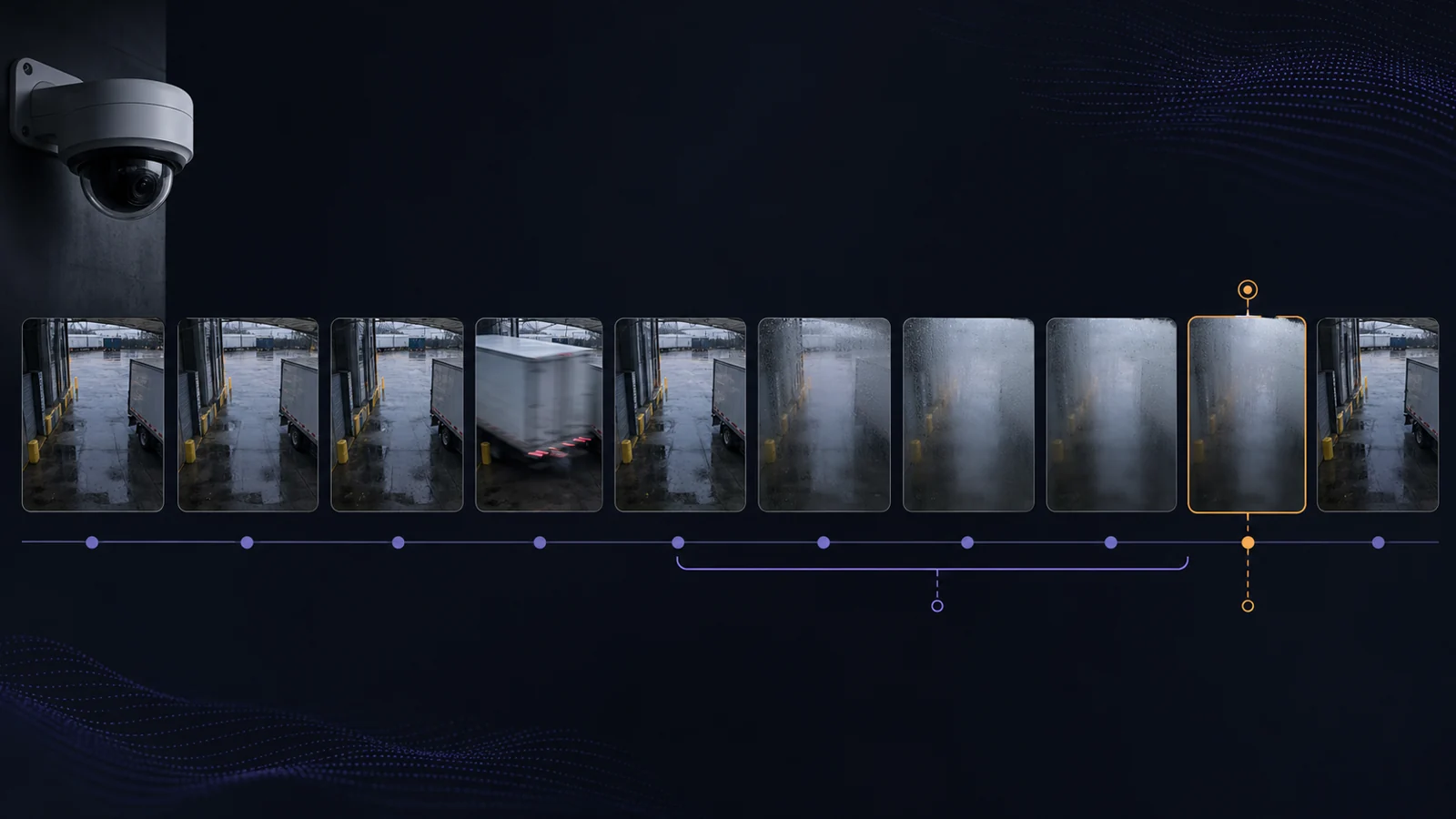
Camera health monitoring automates some of the checks that would otherwise depend on somebody reviewing cameras manually. Depending on the available integration, the software can poll cameras or a VMS, examine stream behaviour, sample images and check recording information. If a condition falls outside an accepted state and remains there for long enough, the system records the evidence and raises an alert for review.
The term “automated camera maintenance” can give the wrong impression. Software can observe, compare, retain evidence and route an exception. It cannot clean a dome, repair a mount or establish the cause of every poor image. People still interpret the evidence, decide what work is needed and check the result. A useful monitoring process is designed with this division in mind.
What continuous monitoring adds
Manual inspections cover parts of camera maintenance that software cannot. A person can inspect an enclosure, confirm the intended field of view, review recorded footage, test an export and judge whether the image is suitable for the camera’s purpose. The limitation is frequency. The camera may change soon after the inspection and remain that way until somebody looks again.
Continuous monitoring runs smaller checks more often. It records each result and directs attention to cameras that may have changed. This is well suited to conditions that can be observed through a camera API, VMS, video stream or sampled image. It is less reliable when the connector exposes little information, the scene has no stable reference, or the decision depends on details that the software cannot infer from an image.
Human review remains part of normal operation. Wollongong City Council’s current CCTV operating procedure, for example, asks staff to confirm at the start of a shift that cameras are online and that the vision is clear. Monitoring can shorten the time before a possible fault reaches those staff. They still decide whether the view contains the detail required for the doorway, face, vehicle or area the camera was installed to cover.
The signals software can use
Camera health software can use several groups of signals, and each answers a different question. A VMS may report that a camera is connected while the view, recording or retrieval path still needs its own check. The available evidence depends on the VMS, the camera, connector permissions and configuration.
Device and VMS information
A camera, recorder or VMS may expose reachability, the last response time, stream profiles, recording service status, storage pressure, native alarms and logs. These signals are usually updated frequently and are useful for finding connection failures, stopped services and overloaded infrastructure.
VMS products already provide important monitoring in this area. Milestone’s XProtect System Monitor documentation for 2025 R1 describes dashboards for failed cameras, overloaded components and recording servers approaching disk or memory limits. The exact signals differ between products, editions and versions. Check the documentation for the deployed release and test the expected alert in that environment.
Stream and sampled-image condition
The monitoring system may obtain a frame or short stream sample at regular intervals. It can then check whether the sample is current and whether the image has become unusually dark, bright, blurred, obstructed, frozen or different from an accepted view. These checks extend beyond a network response, although they assess samples rather than every frame recorded by the system.
The integration determines what can be checked. A VMS connector may provide inventory and server alarms without providing a current image. A direct camera connection may provide a video stream but no information about the archive. ONVIF Profile T standardises parts of advanced video streaming and device behaviour, but profile support does not make every camera and VMS signal available through every integration.
Recording and retention information
Some VMS APIs expose recording indexes, archive entries, storage events or recorder status. A monitoring system can use these to check whether recent recordings appear to exist and whether the platform reports gaps or storage problems. This is useful evidence, but it does not show that every recorded segment can be decoded or that the oldest available recording matches the approved retention period.
Playback, retention and export still need representative end-to-end tests. Checking the oldest playable recording is one practical way to see whether the retention target is being met. The CCTV maintenance and inspection guide covers playback and export checks.
Alert handling and monitor health
Once a condition has been detected, the system needs to show the evidence, assign the alert, record acknowledgement and distinguish between repair and verified closure. The monitoring process also needs a way to report its own failure. If polling stops and no separate check detects that change, the absence of alerts can be misleading.
An independent heartbeat can check that monitoring is still running and that alerts still reach their destination. Test this during an approved maintenance window. Stopping a test monitor should produce a separate notification through the expected channel.
How image checks work
An image check converts part of a video frame into a measurement. A sharpness measure can detect a reduction in edge detail. Brightness measurements can show that frames have become much darker or brighter. Scene comparison can identify a change in the direction or content of the view. Repeated or nearly identical frames may indicate frozen video. Each result describes an observed condition, not its cause.
A dark image may be caused by failed illumination, a changed exposure setting, a camera left in day mode, an obstructed lens or an unlit room that is operating normally. A low sharpness measurement can be associated with defocus, condensation, rain, motion blur or a scene with little detail. The CCTV image-quality guide explains how the timing of the fault and comparisons between day and night footage can help distinguish these causes.
Axis documents a useful example of these limits. Its Image Health Analytics can detect several image conditions on compatible Axis cameras, but the documentation notes that sudden lighting changes, parked vehicles, scenes with little detail and moving spider webs can affect the result. This is why thresholds and validation times have to suit the view.
CHEQIT is designed around this operational reality. Across supported VMS connections and direct RTSP or ONVIF camera sources, it can combine available device and VMS information with stream and visual checks. It then applies persistence rules and retains the evidence behind an exception. Coverage depends on the source, permissions, configured checks, sampling frequency and licence.
When evaluating any image-health alert, check what the software measured, which baseline or threshold it used, how long the condition persisted and what image or history was retained. A label such as “blur” identifies the category that triggered the review. It should not be treated as an instruction to refocus the camera until the evidence has ruled out contamination, weather, movement and playback issues.
Baselines, timing and false alerts
CCTV scenes change for legitimate reasons. Sunlight moves through the year, warehouse lighting follows operating hours, PTZ cameras use several valid positions, and rain can temporarily reduce contrast. A vehicle may block a gate for two minutes without indicating a fault. Monitoring settings need to reflect the scene and the consequence of missing a real problem.
A baseline records an accepted state for comparison. Some cameras need separate references for day and night, or for different operating modes. Baseline updates should be controlled. If the system automatically accepts a camera after it has moved, the new position may become normal before anybody reviews it.
Persistence controls how long a condition must remain outside the accepted state before an alert is opened. The appropriate period depends on the camera. A delivery vehicle may be ignored for a short time at a loading bay, while an obstruction at a fire exit may warrant immediate review. This is the purpose of a configurable validation period.
Recovery rules determine when the alert can clear. Requiring several normal results prevents repeated opening and closing when a measurement sits near the threshold. The setting also needs care. A long persistence period can miss a short but important obstruction, while a broad baseline may accept slow deterioration. Record these choices and test them against footage from the site rather than relying on default values.
How to evaluate a pilot
A controlled pilot is more informative than a feature list because it shows what the monitoring system can observe through the actual cameras, VMS connectors and network paths in use. Choose a small group that includes a stable indoor view, an exposed outdoor camera, a difficult night scene and at least one camera from each integration path being considered.
Use test cameras or a lab whenever a test would interrupt recording or alter a production view. Write down the expected result before the test so that the team can distinguish between a missed condition, a delayed result and an alert that lacks useful evidence.
| Pilot test | What to observe | Evidence to keep | What the result does not establish |
|---|---|---|---|
| Disconnect a lab camera or disable its test stream | Detection time, grouping and escalation | Alert time, last good state, connector log | Whether a reachable camera has a useful image |
| Hold a genuine static test frame | Frozen or repeated-frame behaviour | Short sampled sequence and measurements | Whether every quiet scene will be classified correctly |
| Introduce controlled blur on a lab lens | Sensitivity, persistence and recovery | Accepted, alert and recovered frames | The physical cause of blur |
| Cover part of a lab view temporarily | Obstruction threshold and suppression | Evidence frames with the exact duration | Whether an obstruction was intentional |
| Remove illumination from a test scene | Handling of the day and night transition | Frames before and after the lighting change | Why a production scene became dark |
| Create a recording gap in a test VMS | Visibility of the gap and alert routing | Gap window, VMS event and alert record | Whether all other archive segments play |
| Stop the test monitor | Independent heartbeat behaviour | Heartbeat alert and delivery record | Coverage while the monitor was unavailable |
Record detection delay, duplicate alerts, missed tests, the quality of retained evidence and the time required for review. The main practical question is whether the operator could decide the next safe action from the information provided. Repeat representative tests after changes to the connector, VMS, camera firmware or monitoring policy.
Reviewing and closing alerts
A fault record should keep detection, review, repair and verification separate.
- Detection records the condition observed by the system and the available evidence.
- Review records whether a person considered it to be a real fault, an expected condition or an inconclusive result.
- Repair records any physical or configuration work completed by an authorised person.
- Verification repeats the relevant test and confirms the live and recorded result against the camera’s purpose.
CHEQIT keeps the detected condition and supporting evidence with the exception so that review, repair and verification can be followed as separate steps. It does not inspect every archived frame, guarantee retrieval or replace physical maintenance.
The final verification should use the same condition that exposed the fault. A connectivity alert may clear when the camera reconnects even if its view has changed. An image alert may clear after the dome is cleaned while the recorder continues to store a lower-quality stream. Close the record after checking the relevant signal and the live or recorded result required from that camera.
Choosing cameras for a first test
Five representative cameras are enough to begin mapping coverage. For each camera, record which device, image, recording and workflow signals the current system can observe. Note the test used, the evidence retained, who receives the alert and what must be checked before closure. Review any missing areas according to the consequence of a fault on that camera, then decide whether the monitoring approach is suitable for a wider pilot.
This material is general operational guidance, not legal, regulatory or safety advice. Source descriptions were checked on 14 August 2026. Product and manufacturer capabilities change, so verify them against the versions in your estate.